

Finding the right image online can feel frustrating. Whether you are a blogger hunting for the perfect photo, a designer seeking inspiration, or a researcher verifying visual facts, mastering image search techniques matters. Not all searches are equal. Some take minutes. With the right approach, you can find what you need in seconds. This article walks you through essential image search techniques—simple and advanced—so you can get faster, more accurate results every time.
Why Image Search Matters Today
Image search has evolved far beyond typing a few words and scrolling through results. Modern techniques now let you:
- Find exactly where an image appears online
- Discover visually similar photos or objects
- Track down the original source or creator
- Filter images by size, color, rights, or format
These capabilities save time, help avoid copyright trouble, and improve the quality of your work, whether it’s for school, business, or personal projects.
Start With Strong Keywords
Most people start image searches with generic words like “dog” or “shoes.” That usually returns thousands of unrelated pictures. Your first step is to make your keywords precise and descriptive.
Try adding:
- Color or style: “black leather jacket”
- Context: “eiffel tower sunset photo”
- Usage: “background wallpaper marine life”
The more detailed your query, the more relevant your results become. This is one of the simplest but most effective image search techniques for faster results.
Use Built-In Filters to Narrow Results
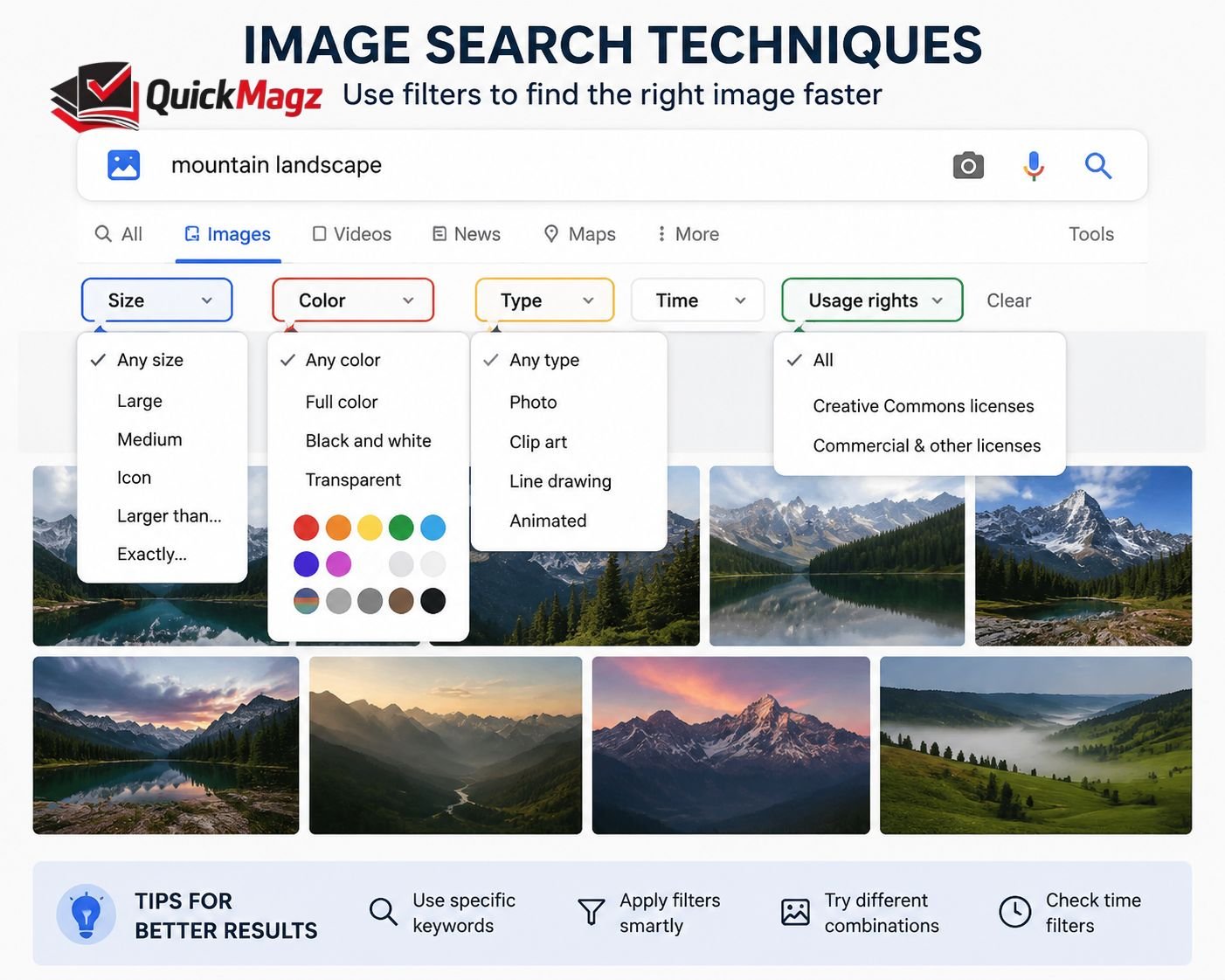
Search engines like Google and Bing offer filters right on the results page. These tools are often overlooked, but they can dramatically reduce the time it takes to find the image you want.
Helpful filters include:
- Size: Find larger images for printing or design
- Color: Limit results by dominant color
- Type: Search for photos, clip art, icons
- Usage Rights: Locate images safe to reuse
Using these filters means you don’t waste time sifting through irrelevant visuals.
Reverse Image Search: Work From Image to Source
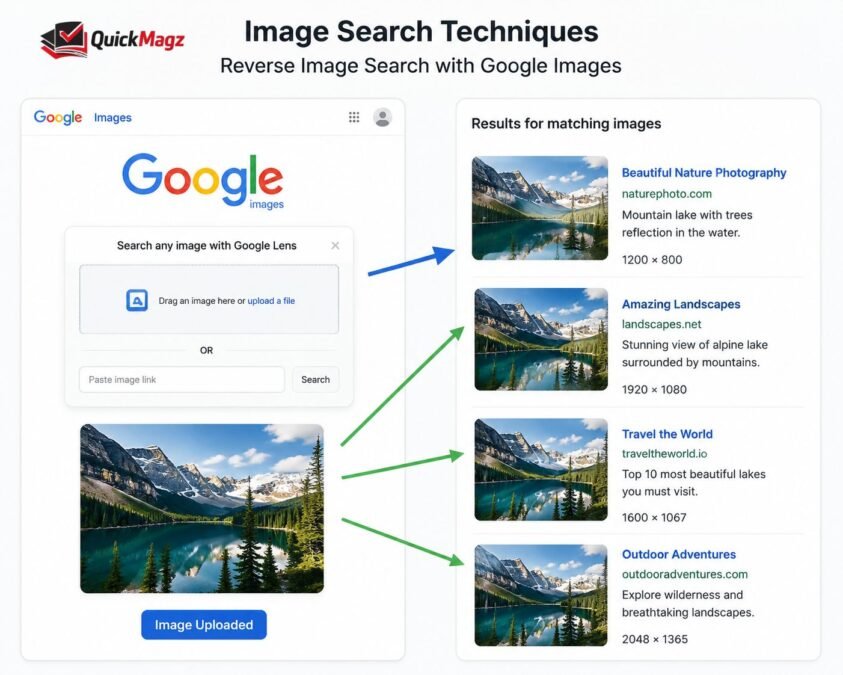
Sometimes you already have an image and you want more information about it—maybe its origin, higher resolution versions, or where else it appears on the web. That’s when reverse image search becomes the most powerful technique.
With reverse image search:
- Upload the image file
- Or paste an image URL
- The engine finds visually similar or identical matches
Popular tools for this include:
- Google Images (classic and widely indexed)
- TinEye (excellent for tracking where an image appears)
- Bing Visual Search and others, depending on need
This method helps you trace who first published a photo, find better-quality versions, or confirm if a picture has been altered.
Crop and Refine the Image Before Searching
One of the smartest things you can do before reverse searching is crop the image to remove background noise. Backgrounds, text, or unrelated objects confuse search engines and pull in unrelated results.
Focus the search on:
- The main object
- A clear logo or pattern
- A distinct part of the image
This allows the algorithm to zero in on the detail you care about, giving you faster and more precise results.
Combine Multiple Techniques for Best Results
Few searches succeed with just one method. When you combine these techniques, you get better speed and accuracy:
- Start with keyword filters to narrow possibilities
- Use reverse image search for exact matches
- Add keywords in the reverse search box to refine context
- Apply filters again to weed out low-quality or irrelevant images
This layered approach turns a slow, scattershot process into something much more efficient.
Explore Visual and Object Search Tools
Beyond keyword and reverse search, newer tools let you search visually or by object:
- Visual similarity search finds images with the same style, mood, or palette
- Object detection tools let you isolate an item in the picture (like a pair of shoes) and find similar products online
These techniques are particularly useful for designers, eCommerce professionals, or anyone working with visuals creatively.
Check Usage Rights Early
Before you use images you find, especially on websites or social posts, you should always check the usage rights. Some pictures are copyrighted and require permission or payment.
Most search tools let you filter by:
- Creative Commons licenses
- Commercial-use allowed
- Free to share or modify
Filtering by rights saves future headaches and ensures ethical, legal use of visuals.
Stay Organized With Your Results
Once you find images that match your needs, take a moment to organize them:
- Save in folders based on projects
- Rename files with meaningful titles
- Track where each image came from
This helps if you need to revisit or share sources later, and prevents duplicated effort.
Avoid Common Pitfalls
Even with the best techniques, common mistakes slow searches down:
- Using vague or one-word keywords
- Ignoring filters
- Uploading blurry or low-resolution images
- Forgetting to check usage rights
Being aware of these issues makes your search process cleaner, safer, and faster.
Why These Techniques Work
Modern image search engines don’t actually “see” images like humans do. Instead, they rely on metadata, visual patterns, and machine analysis to match queries to results. Using the techniques above works because they speak the language these tools understand—details, quality input, and clear intent.
Final Thoughts
Mastering image search techniques isn’t about learning as many tools as possible. It’s about knowing when and how to use the right method for your goal. Whether it’s refining keywords, applying filters, or using reverse image search effectively, every step you take speeds up the process and sharpens your results.
Once you internalize these strategies, finding images becomes not just faster but smarter and more purposeful. The time you save adds up, and the quality of visuals you find improves—making this skill truly worth mastering.
FAQs
1. What are image search techniques?
Image search techniques are strategies and tools used to find images online more quickly and accurately. They include keyword refinement, filters, and reverse image search.
2. How can I improve my image search results?
Use precise keywords, apply size or color filters, and leverage reverse image search to locate exact matches or similar visuals.
3. What is reverse image search?
Reverse image search allows you to upload an image or provide its URL to find where it appears online, its source, or similar images.
4. Are there free tools for image searching?
Yes. Google Images, Bing Visual Search, and TinEye are popular free tools that offer both standard and reverse image searches.
5. How do I avoid copyright issues when using images?
Always check the image’s usage rights before using it. Use filters for Creative Commons or commercially usable images to stay compliant.
